
Reference Tables
Reference tables (also called lookup tables) are reusable lists of values you join against in detection rules. They let you correlate and enrich event data without hardcoding long lists directly into the detection rule logic.
Why Use Reference Tables
It's far easier to understand and maintain a reference list than a giant list of values in a detection rule.
Detection rules often need to check if a value appears in a list: known LOLBins, suspicious domains, malware hashes, or organizational context like VIP users. Hardcoding these values creates problems:
- Every rule duplicates the same list
- Updates require editing every rule
- Long lists of values make rules hard to read and maintain
Reference tables solve this. Instead of writing dozens of process names, domains, or hashes into every rule, you can create a reference table once in the Nebulock platform and reference it across multiple detections. When you update the table by adding a new value or removing one, every rule that uses it inherits the change immediately.
Common Use Cases
| USE CASE | DESCRIPTION |
|---|---|
| Threat Intelligence | Domains, IPs, file hashes from threat intel feeds. |
| Alert Suppression | Known good processes, approved domains, trusted IPs. Allowlists that reduce false positives. |
| LOLBins | Living-off-the-land binaries attackers abuse. Catalog the common files used and detect suspicious use of legitimate tools. |
| Suspicious Patterns | File extensions, registry keys, command patterns associated with attacks. |
Nebulock-Provided Reference Tables
Nebulock includes pre-built reference tables you can use immediately in your detection rules. These tables are maintained by Nebulock's DE/TH team and are updated regularly.
Available Tables:
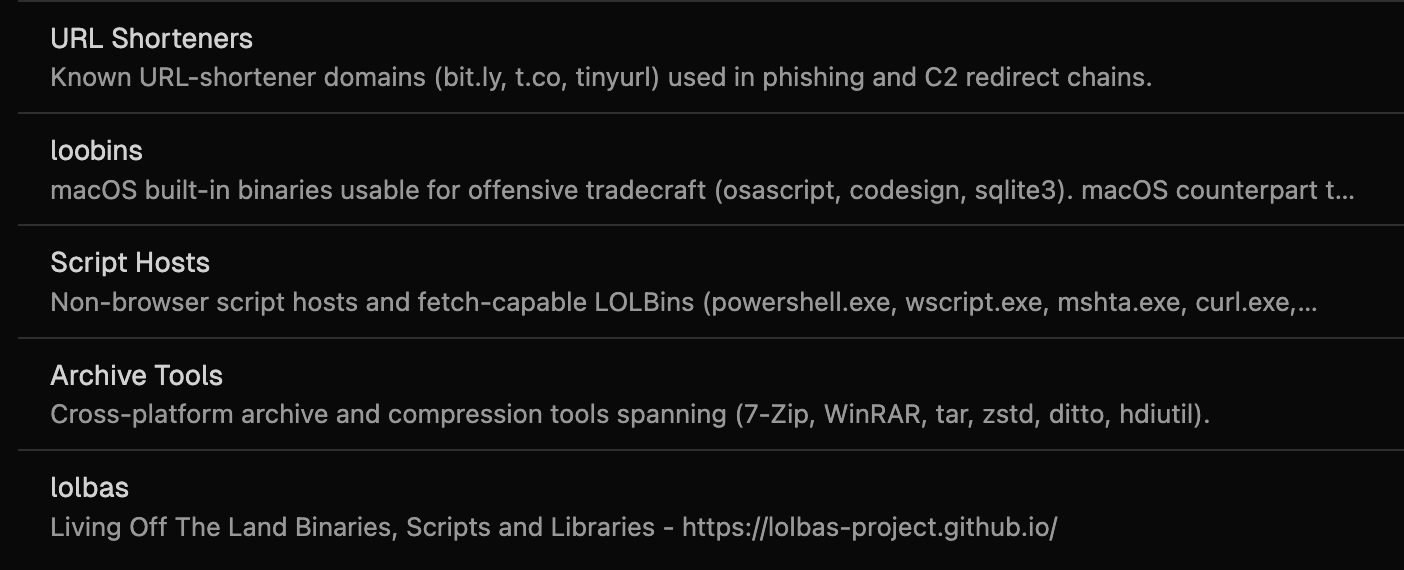
These tables are read-only. To customize them for your environment, use the Clone option to create a new version of the list that you own, and edit the values as you see fit.
Creating Reference Tables
- Navigate to Detections > Reference Tables from the left sidebar
- Click + Create Reference Table in the top-right corner
- Enter a Table Name.
- The slug value will be created automatically. This value is used in the detection rule and only accepts alphanumeric characters and dash.
- Add a Description of what the table contains and when to use it
- Add the Field value you wish to create a table for, e.g "dns.question.name"
- Use the Schema Field Reference Guide to find the right field.
- Add values:
- Click + Add Value to enter items one at a time
- Or click Bulk Import to import a CSV file.
- Click Save
The reference table is now available for any of your detection rules.
Managing Reference Tables
Editing Values
- Navigate to Detections > Reference Tables
- Open the reference table you want to modify
- Add new values with + Add Value or remove existing ones
- Click Save
All detection rules that reference this table immediately use the updated list. No redeployment needed.
Viewing References
Each reference table page shows which detection rules currently use it. Check this to understand the impact of changes before updating the table.
Deleting Reference Tables
You cannot delete a reference table while detection rules still reference it. Remove the table from all rules first, then delete it.
Best Practices
- Document the source of values in the table description. If the list comes from MITRE, a threat intel feed, or organizational policy, note it so future maintainers understand where it came from.
- Keep tables focused on one concept. Don't mix LOLBins and malicious domains in the same table. Separate tables are easier to maintain and reason about.
- Test after updates by running a Retrohunt on rules that reference the table. This confirms that new values don't introduce unexpected false positives.
Related Features
Create and Deploy Detection Rules — Complete guide to detection rule creation and testing
Detection Versioning — Track changes to detection logic over time
Updated 1 day ago