
Microsoft Event Hub
Documentation for setting up an Azure Event Hub to send telemetry to Nebulock.
Step 1: Create Custom Deployment
- Log in to the Azure Portal.

- In the top search bar, type "Deploy a custom template" and select it.
- Click on "Build your own template in the editor"
- Paste file
- Create new resource group
{
    "$schema": "https://schema.management.azure.com/schemas/2019-04-01/deploymentTemplate.json#",
    "contentVersion": "1.0.0.0",
    "parameters": {
      "prefix": {
        "type": "string",
        "defaultValue": "nebu"
      },
      "ehName": {
        "type": "string",
        "defaultValue": "defender-logs"
      },
      "multiTenantAppObjectId": {
        "type": "string"
      },
      "defenderSpObjectId": {
        "type": "string"
      },
      "partitionCount": {
        "type": "int",
        "defaultValue": 32,
        "minValue": 1,
        "maxValue": 32,
        "metadata": {
          "description": "Number of partitions for the Event Hub. Each partition gives 1 MB/sec ingress and 2 MB/sec egress. IMMUTABLE after creation on Standard tier — size carefully up front. Standard tier max is 32. Partition count does not affect cost; only TUs do."
        }
      },
      "startingThroughputUnits": {
        "type": "int",
        "defaultValue": 4,
        "minValue": 1,
        "maxValue": 40,
        "metadata": {
          "description": "Starting (and minimum) Throughput Unit count for the namespace. Each TU provides 1 MB/sec ingress and 2 MB/sec egress, and adds ~$22/month. Must be <= maxThroughputUnits if auto-inflate is enabled."
        }
      },
      "enableAutoInflate": {
        "type": "bool",
        "defaultValue": true,
        "metadata": {
          "description": "When true, the Event Hub namespace automatically scales Throughput Units up to maxThroughputUnits as ingress approaches capacity. Auto-inflate only scales up, not down. When false, the namespace is locked at startingThroughputUnits."
        }
      },
      "maxThroughputUnits": {
        "type": "int",
        "defaultValue": 10,
        "minValue": 1,
        "maxValue": 40,
        "metadata": {
          "description": "Auto-inflate ceiling for Throughput Units (Standard tier max is 40). Ignored if enableAutoInflate is false. Must be >= startingThroughputUnits."
        }
      }
    },
    "variables": {
      "stName": "[take(concat(parameters('prefix'), uniqueString(resourceGroup().id)), 24)]",
      "ehNsName": "[format('{0}-ns', parameters('prefix'))]",
      "ehDataReceiverRoleId": "[subscriptionResourceId('Microsoft.Authorization/roleDefinitions', 'a638d3c7-ab3a-418d-83e6-5f17a39d4fde')]",
      "ehDataSenderRoleId": "[subscriptionResourceId('Microsoft.Authorization/roleDefinitions', '2b629674-e913-4c01-ae53-ef4638d8f975')]",
      "blobDataContributorRoleId": "[subscriptionResourceId('Microsoft.Authorization/roleDefinitions', 'ba92f5b4-2d11-453d-a403-e96b0029c9fe')]",
      "monitoringReaderRoleId": "[subscriptionResourceId('Microsoft.Authorization/roleDefinitions', '43d0d8ad-25c7-4714-9337-8ba259a9fe05')]"
    },
    "resources": [
      {
        "type": "Microsoft.EventHub/namespaces",
        "apiVersion": "2021-11-01",
        "name": "[variables('ehNsName')]",
        "location": "[resourceGroup().location]",
        "sku": {
          "name": "Standard",
          "capacity": "[parameters('startingThroughputUnits')]"
        },
        "properties": {
          "minimumTlsVersion": "1.2",
          "disableLocalAuth": true,
          "isAutoInflateEnabled": "[parameters('enableAutoInflate')]",
          "maximumThroughputUnits": "[if(parameters('enableAutoInflate'), parameters('maxThroughputUnits'), 0)]"
        }
      },
      {
        "type": "Microsoft.EventHub/namespaces/eventhubs",
        "apiVersion": "2021-11-01",
        "name": "[format('{0}/{1}', variables('ehNsName'), parameters('ehName'))]",
        "properties": {
          "partitionCount": "[parameters('partitionCount')]",
          "messageRetentionInDays": 7
        },
        "dependsOn": [
          "[resourceId('Microsoft.EventHub/namespaces', variables('ehNsName'))]"
        ]
      },
      {
        "type": "Microsoft.Storage/storageAccounts",
        "apiVersion": "2021-09-01",
        "name": "[variables('stName')]",
        "location": "[resourceGroup().location]",
        "kind": "StorageV2",
        "sku": {
          "name": "Standard_LRS"
        },
        "properties": {
          "minimumTlsVersion": "TLS1_2",
          "allowSharedKeyAccess": false
        }
      },
      {
        "type": "Microsoft.Storage/storageAccounts/blobServices/containers",
        "apiVersion": "2021-09-01",
        "name": "[format('{0}/default/checkpoint-container', variables('stName'))]",
        "dependsOn": [
          "[resourceId('Microsoft.Storage/storageAccounts', variables('stName'))]"
        ]
      },
      {
        "type": "Microsoft.Authorization/roleAssignments",
        "apiVersion": "2022-04-01",
        "name": "[guid(resourceId('Microsoft.EventHub/namespaces/eventhubs', variables('ehNsName'), parameters('ehName')), parameters('multiTenantAppObjectId'), variables('ehDataReceiverRoleId'))]",
        "scope": "[format('Microsoft.EventHub/namespaces/{0}/eventhubs/{1}', variables('ehNsName'), parameters('ehName'))]",
        "properties": {
          "roleDefinitionId": "[variables('ehDataReceiverRoleId')]",
          "principalId": "[parameters('multiTenantAppObjectId')]",
          "principalType": "ServicePrincipal"
        },
        "dependsOn": [
          "[resourceId('Microsoft.EventHub/namespaces/eventhubs', variables('ehNsName'), parameters('ehName'))]"
        ]
      },
      {
        "type": "Microsoft.Authorization/roleAssignments",
        "apiVersion": "2022-04-01",
        "name": "[guid(resourceId('Microsoft.Storage/storageAccounts', variables('stName')), parameters('multiTenantAppObjectId'), variables('blobDataContributorRoleId'))]",
        "scope": "[format('Microsoft.Storage/storageAccounts/{0}', variables('stName'))]",
        "properties": {
          "roleDefinitionId": "[variables('blobDataContributorRoleId')]",
          "principalId": "[parameters('multiTenantAppObjectId')]",
          "principalType": "ServicePrincipal"
        },
        "dependsOn": [
          "[resourceId('Microsoft.Storage/storageAccounts', variables('stName'))]"
        ]
      },
      {
        "type": "Microsoft.Authorization/roleAssignments",
        "apiVersion": "2022-04-01",
        "name": "[guid(resourceId('Microsoft.EventHub/namespaces/eventhubs', variables('ehNsName'), parameters('ehName')), parameters('defenderSpObjectId'), variables('ehDataSenderRoleId'))]",
        "scope": "[format('Microsoft.EventHub/namespaces/{0}/eventhubs/{1}', variables('ehNsName'), parameters('ehName'))]",
        "properties": {
          "roleDefinitionId": "[variables('ehDataSenderRoleId')]",
          "principalId": "[parameters('defenderSpObjectId')]",
          "principalType": "ServicePrincipal"
        },
        "dependsOn": [
          "[resourceId('Microsoft.EventHub/namespaces/eventhubs', variables('ehNsName'), parameters('ehName'))]"
        ]
      },
      {
        "type": "Microsoft.Authorization/roleAssignments",
        "apiVersion": "2022-04-01",
        "name": "[guid(resourceId('Microsoft.EventHub/namespaces', variables('ehNsName')), parameters('multiTenantAppObjectId'), variables('monitoringReaderRoleId'))]",
        "scope": "[format('Microsoft.EventHub/namespaces/{0}', variables('ehNsName'))]",
        "properties": {
          "roleDefinitionId": "[variables('monitoringReaderRoleId')]",
          "principalId": "[parameters('multiTenantAppObjectId')]",
          "principalType": "ServicePrincipal"
        },
        "dependsOn": [
          "[resourceId('Microsoft.EventHub/namespaces', variables('ehNsName'))]"
        ]
      }
    ]
  }
- Create new resource group
- Paste the correct values for the object IDs from previous step
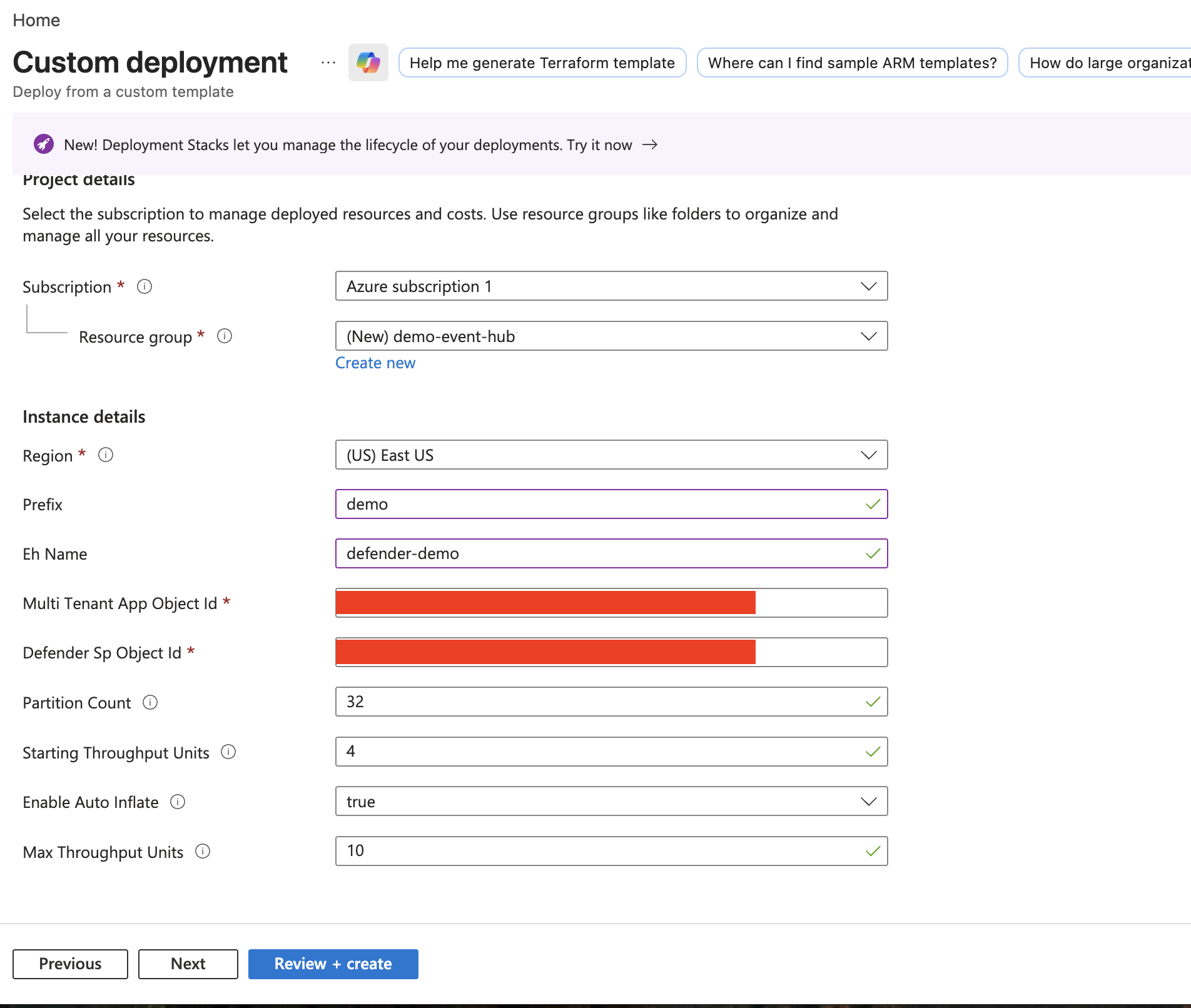
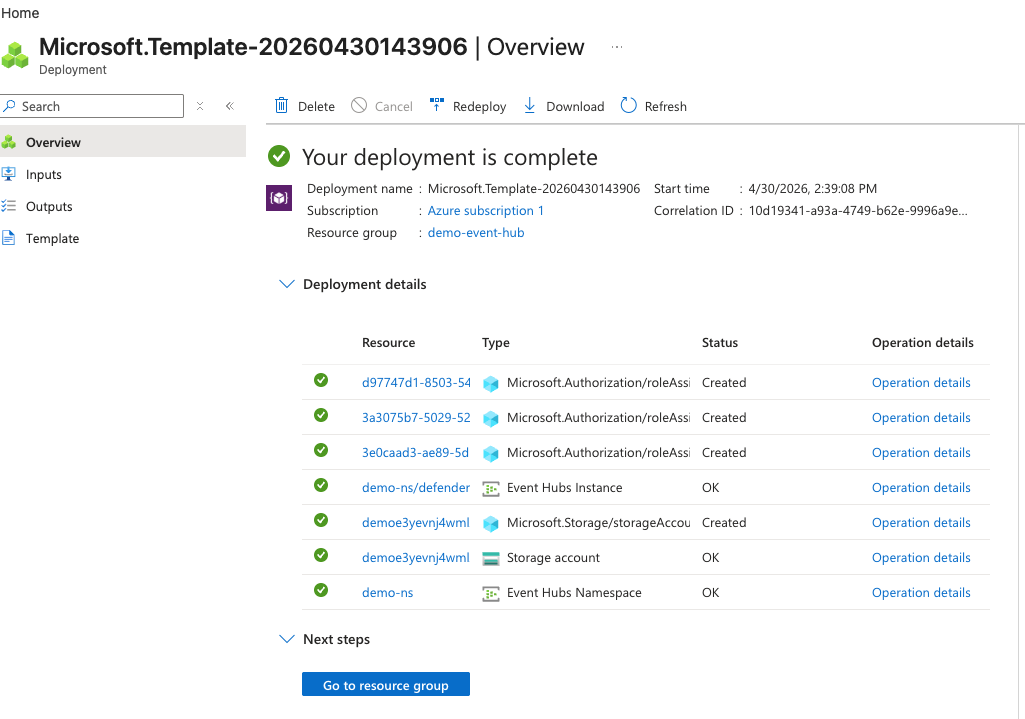
- Click create and validate successful creation:
Step 2: Get all the variables you need
- This will be used for the following steps
MAC
echo -n "Event Hub namespace name: "; read NS
echo -n "Event Hub name: "; read EH
echo -n "Storage account name: "; read SA

NS_ID=$(az eventhubs namespace list --query "[?name=='$NS'].id" -o tsv)
EH_NAMESPACE=$(az eventhubs namespace list --query "[?name=='$NS'].serviceBusEndpoint" -o tsv | sed 's|https://||;s|:443/||')

{
  echo "Configs for Streaming API:"
  echo "AZURE_EH_RESOURCE_ID=${NS_ID}"
  echo "AZURE_EH_NAME=$EH"
  echo "------------------------------------"
  echo "Configs for Nebulock Integration:"
  echo "AZURE_EH_TENANT_ID=$(az account show --query tenantId -o tsv)"
  echo "AZURE_EH_NAMESPACE=$EH_NAMESPACE"
  echo "AZURE_STORAGE_ACCOUNT_NAME=$SA"
  echo "AZURE_CONTAINER_NAME=checkpoint-container"
}
Windows
$NS = Read-Host "Event Hub namespace name"
$EH = Read-Host "Event Hub name"
$SA = Read-Host "Storage account name"

$NS_ID = az eventhubs namespace list --query "[?name=='$NS'].id" -o tsv
$EH_FQDN = az eventhubs namespace list --query "[?name=='$NS'].serviceBusEndpoint" -o tsv
$EH_NAMESPACE = $EH_FQDN.Replace("https://", "").Replace(":443/", "")

Write-Host "Configs for Streaming API:"
Write-Host "AZURE_EH_RESOURCE_ID=$NS_ID"
Write-Host "AZURE_EH_NAME=$EH"
Write-Host "------------------------------------"
Write-Host "Configs for Nebulock Integration:"
Write-Host "AZURE_EH_TENANT_ID=$(az account show --query tenantId -o tsv)"
Write-Host "AZURE_EH_NAMESPACE=$EH_NAMESPACE"
Write-Host "AZURE_EH_NAME=$EH"
Write-Host "AZURE_STORAGE_ACCOUNT_NAME=$SA"
Write-Host "AZURE_CONTAINER_NAME=checkpoint-container"
Step 3: Make defender push to event hub
Make defender push to event hub
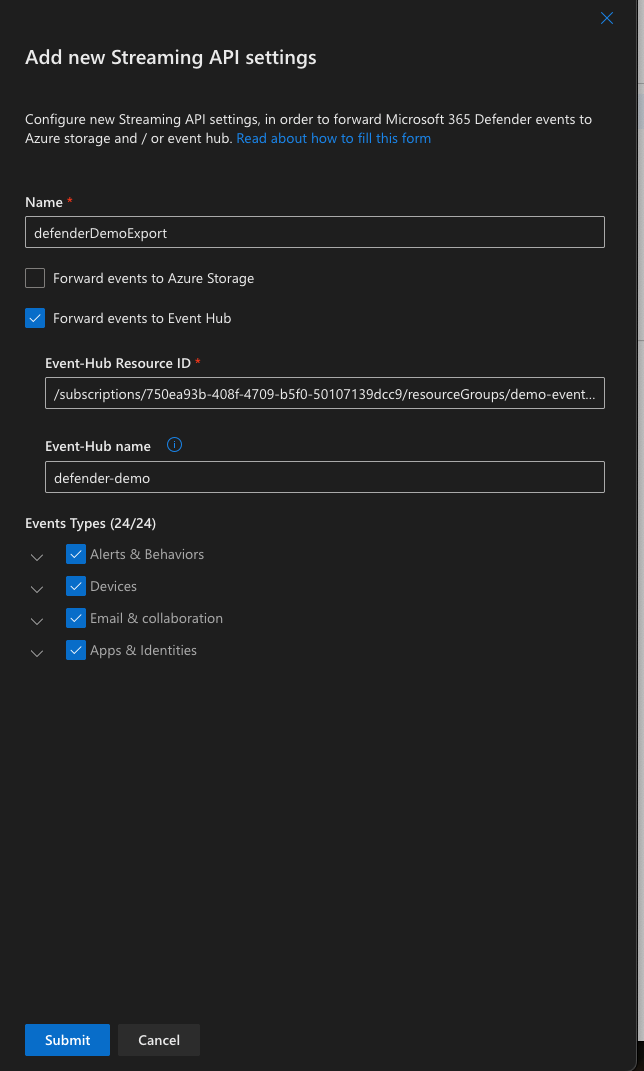
Go to security.microsoft.com → Settings → Microsoft Defender XDR → Streaming API.
Create a new stream:
- Use the Azure EH Resource ID From Above
- Use Azure EH Name from above script
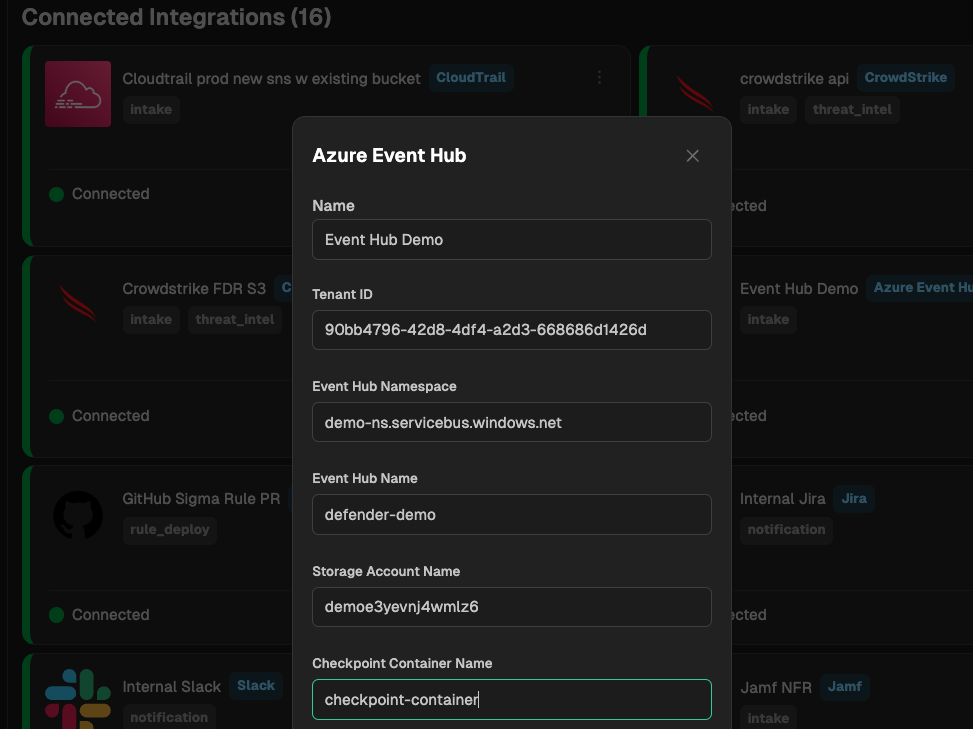
Step 4: Add configs to Nebulock integration
Use the outputs of the previous script to fill in the values
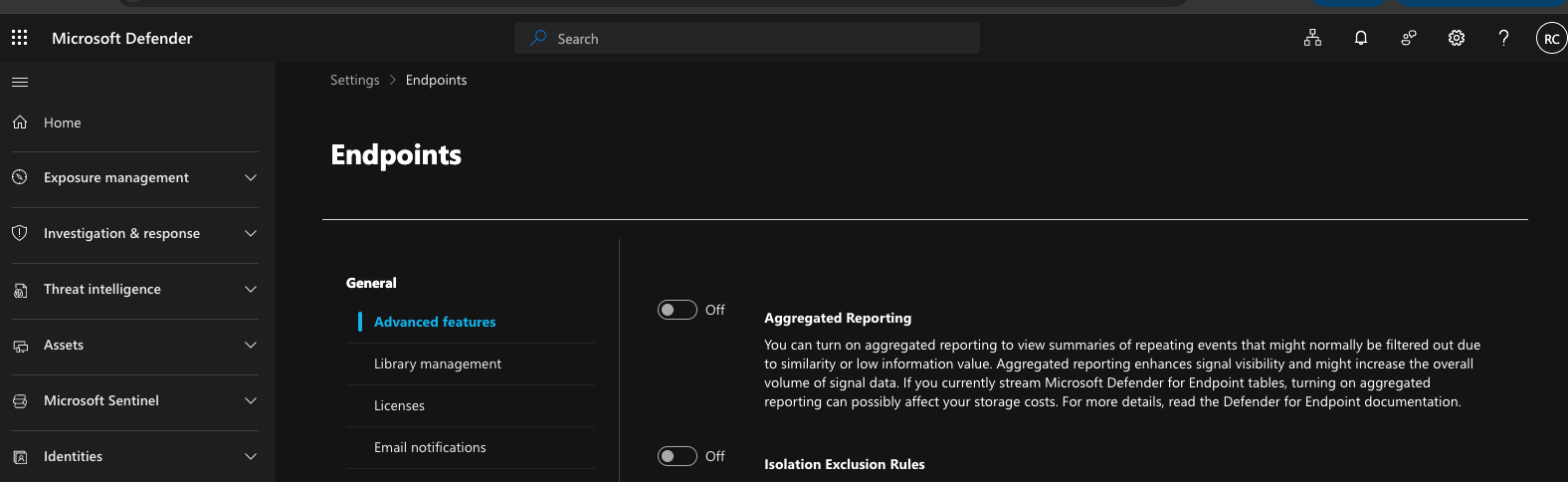
Make sure aggregate reporting is turned off:
Updated 4 months ago
Did this page help you?