
Setting Up An Actors Watchlist
The watchlist marks actors (correlated people and their identities/hosts) as higher risk so the rest of Nebulock can treat them with extra scrutiny. Any time hunts are run, the agents will prioritize searching across high risk actors.
Typical uses:
- Someone who repeatedly clicks phishing links or installs unapproved software
- Temporary extra monitoring after a password compromise
- Additional attention during layoffs or other insider-risk windows
Watchlist status lives on the actor, not on a single user identity record. An actor groups related users and hosts. Findings agents use risk_level (and the actor description) to raise severity or promote otherwise-benign activity for review. Hunts that look up a group of users will pay extra attention when those users belong to watchlisted actors.
Risk levels
risk_level | Meaning |
|---|---|
| normal | Normal. Default for new actors. |
| Watchlist | Ongoing watchlist. Stays in effect until you set the actor back to normal. |
| Temporary Watchlist | Time-bounded watchlist. Requires a future escalated_till (UTC). A background job returns the actor to normal after that time. |
Actors can be updated directly inside the Nebulock UI, under the actors tab:
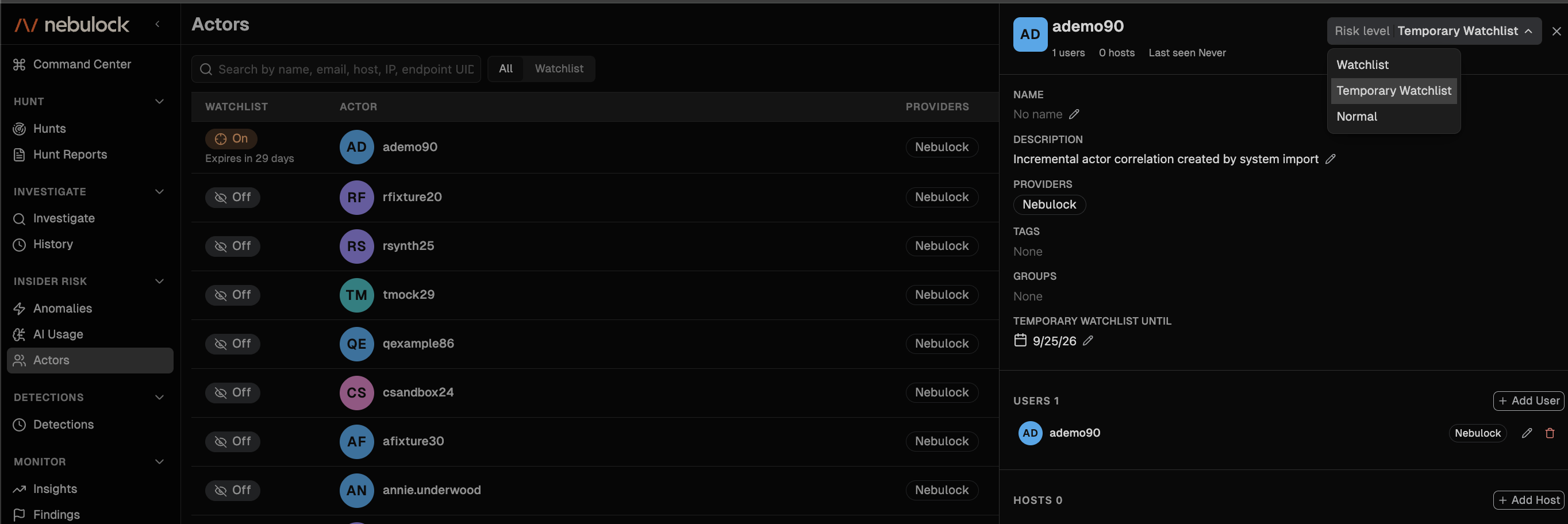
However, Nebulock also provides a comprehensive API, enabling teams to programmatically create and update watchlists. See our API reference docs for full docs.
Updated about 2 months ago