
User Roles and Permissions
Control what each user in your organization can see and do in Nebulock by assigning roles.
Nebulock uses role-based access control (RBAC) to determine what each user in your organization can see and do. Every user is assigned one or more roles, and each role grants a defined set of permissions across the platform.
Roles are assigned per user in Settings → Users. A user's access is the combined total of every role assigned to them.
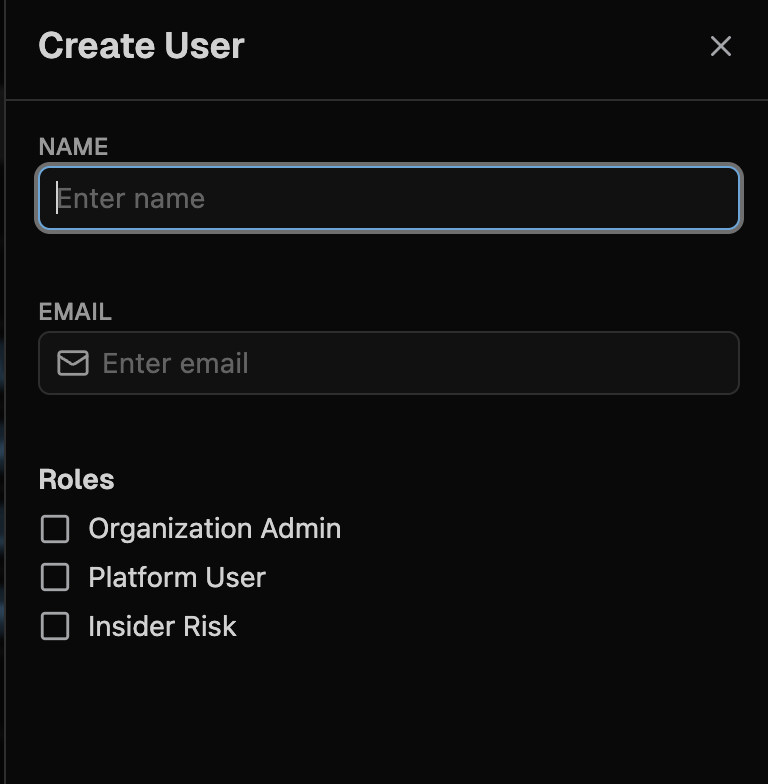
Available roles
| Role | Who it's for | What it grants |
|---|---|---|
| Platform User | Analysts, threat hunters, detection engineers, and anyone who uses Nebulock day to day | Full access to the threat hunting platform, including Hunts, Detections, Findings, Anomalies, Actors, and AI Usage |
| Organization Admin | The people who manage your Nebulock tenant | Access to administrative settings only: Users, API Keys, Vespyr Settings, Integrations, and Custom Configurations |
| Insider Risk Analyst | Users who should only see insider risk data | Access to Anomalies, Actors, and AI Usage. No access to the rest of the platform |
Roles do not inherit from one another.Assigning Organization Admin does not grant access to the platform itself, and assigning Platform User does not grant access to administrative settings. A person who needs to both manage your tenant and run hunts must be assigned both roles.
We are expanding the available roles over time and recommend you follow least privilege best practices rather than assign all roles to all users.
What each role can access
Platform User
Platform User is the standard role for anyone who uses Nebulock. It grants full access to:
- Hunts and all hunt sub-pages, including Vespyr hunts and hunt reports
- Detections, including creating, editing, deploying, and version history
- Findings
- Anomalies
- Actors, including the actors watchlist
- AI Usage
- Command Center and Insights
A Platform User can't add or remove users, create API keys, configure integrations, manage Vespyr's automated hunt settings, or change custom configurations. Those require Organization Admin.
When a Platform User signs in, they land on the Command Center.
Organization Admin
Organization Admin governs your Nebulock tenant. It grants full access to:
- Users: add users, remove users, and assign roles
- API Keys: create, view, and revoke API keys
- Integrations: connect and configure data sources and destinations
- Vespyr: configure scheduled and automated hunts
- Custom Configurations: tenant-level configuration settings
Organization Admin does not grant access to hunts, detections, findings, or any other part of the threat hunting platform. Administrators who also need to use the platform should additionally be assigned Platform User.
Insider Risk Analyst
Insider Risk Analyst is a restricted role for users who should only see insider risk data. It grants full access to:
- Anomalies and all anomalies sub-pages
- Actors
- AI Usage, including AI Usage settings
Insider Risk Analysts can't see findings derived from AnomaliesWhile the role grants access to the Anomalies dashboard, findings generated from anomalous activity live under Findings, which this role does not include. If an analyst needs to work those findings, they also need Platform User.
An Insider Risk Analyst with no other roles can't see Hunts, Detections, Findings, Insights, or the Command Center. These areas are hidden from navigation and blocked at the API.
When an Insider Risk Analyst signs in without any other role, they land on the Anomalies page.
Assign a role to a user
You must be an Organization Admin to assign roles.
- Go to Settings → Users.
- Select an existing user, or click Add User to create a new one.
- Under Roles, select every role the user needs. Remember that roles don't inherit, so select all that apply.
- Save. New users receive a welcome email with first-time login instructions.
Role changes take effect the next time the user signs in.
Common role combinations
| The person | Assign |
|---|---|
| Security analyst or threat hunter | Platform User |
| Detection engineer | Platform User |
| Tenant administrator who does not hunt | Organization Admin |
| Team lead who administers and hunts | Organization Admin and Platform User |
| Insider risk specialist | Insider Risk Analyst |
| Insider risk specialist who also investigates findings | Insider Risk Analyst and Platform User |
Roles and single sign-on
Roles are assigned in Nebulock, not in your identity provider. If your organization uses Okta SAML SSO or Entra SAML SSO, SSO controls who can sign in. Roles still control what they can do once they're in.
Updated about 13 hours ago