
Actors, Watchlist, and Automated Insider Risk Hunts
Use Watchlists to flag and hunt higher risk Actors
An Actor is a logical object that represents a person, system account, or agent across your organization. Nebulock correlates multiple accounts from different vendors (like your identity provider, SaaS applications, and cloud platforms) into a single Actor. This correlation enables you to attribute all activity; logins, API calls, data access, and configuration changes, to the actual entity performing those actions, regardless of which vendor account was used.
The Watchlist marks Actors as higher risk so the Nebulock platform can treat them with extra scrutiny. The Watchlist configuration will determine the Actor risk level.
How the Watchlist is used
When hunts are run, the agents will prioritize searching across higher risk actors. Hunts that look up a group of users will pay extra attention when those user identities are associated with higher risk Actors. Findings agents will raise severity or promote otherwise-benign activity of higher risk Actors for review.
Typical reasons to add an Actor to the Watchlist:
- Someone who repeatedly clicks phishing links or installs unapproved software
- Temporary extra monitoring after a password compromise
- Additional attention during layoffs or other insider-risk windows
Add an Actor to the Watchlist
Watchlist configuration is associated with an Actor, not on a single user identity record. An Actor object groups related users and hosts.
Actors can be updated directly inside the Nebulock portal, under the Actors tab:
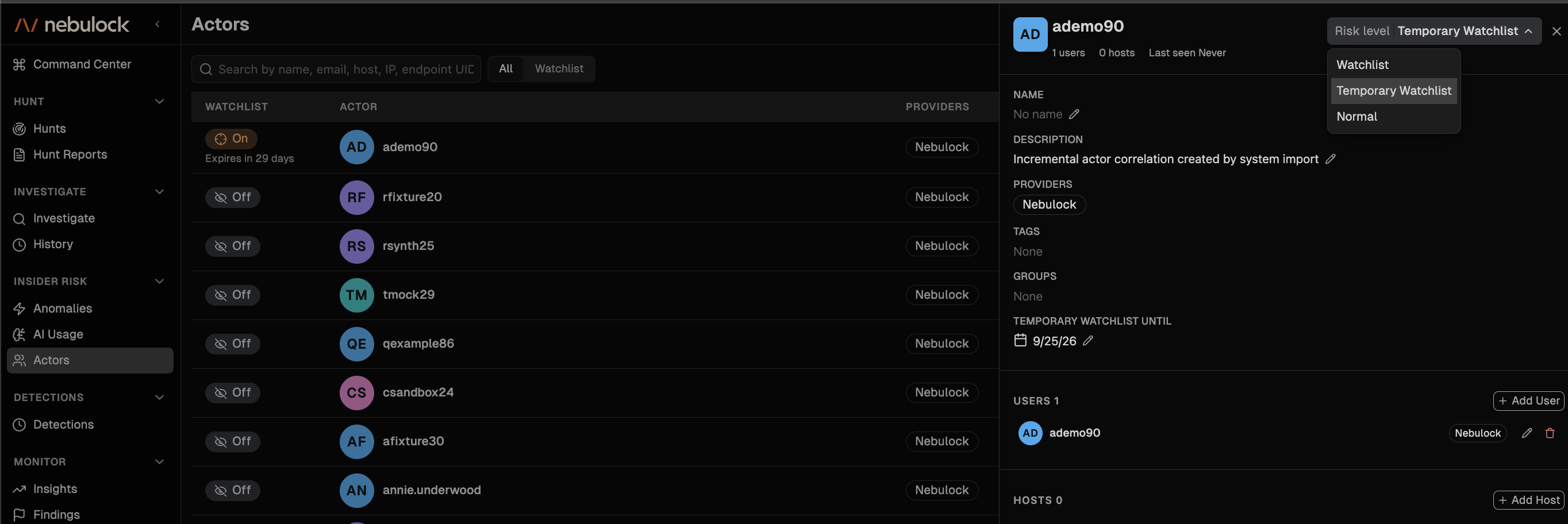
Actor Risk Level
| Risk Level ( risk_level in API) | Risk Level Setting (UI) | Meaning |
|---|---|---|
low | Normal | Low risk. Default for new actors. |
escalated | Temporary Watchlist | Escalated risk. Time-bounded. Set via Temporary watchlist until (default 30 days from today if unspecified). Actor returns to low / Normal after that time, not to its prior value. |
high | Watchlist | High risk. Stays in effect until changed. |
Note on the Temporary Watchlist expiry behavior
Changing the Actor Risk Level to Temporary Watchlist does not save the prior setting. When the Temporary watchlist until date passes, the Actor Risk Level setting is changed to Normal, regardless of what it was previously.
If an Actor Risk Level is Watchlist and you move them to Temporary Watchlist, the settting will not return to Watchlist automatically when the Temporary watchlist until date passes.
Automated Insider Risk Hunts
When Actors are added to the Watchlist, Vespyr can automatically run dedicated hunts against those users with lowered detection thresholds. These Watchlist Insider-Risk Reviews surface borderline suspicious activity that would typically be filtered out for normal users.
Watchlist hunts run on a schedule you configure and provide clear reporting on reviewed Actors and entities even when no suspicious activity is found. You can choose from three scheduling options:
- Daily: Covers the last day (lighter, faster hunt)
- Weekly: Runs every Monday, covers the last 7 days (full-depth hunt)
- Monthly: Runs on the 1st of each month, covers the last 31 days (full-depth hunt)
Enable Watchlist Hunts
Watchlist Hunts are disabled by default. To enable them, go to Settings > Vespyr Settings and select your preferred schedule under Watchlist Hunts.
Watchlist Hunts only run when autonomous hunts are enabled and at least one Actor is on your Watchlist. Scheduled hunts run with the daily sweep at 02:30 UTC.
Actor API
Nebulock provides an API to create and update Actors. See our API reference docs for full docs.
Updated 19 days ago